AI Everywhere: Assistive Intelligence in Oracle Cloud
A platform-wide initiative to weave AI guidance directly into OCI workflows, reducing friction in high-stakes tasks, building user trust, and creating scalable patterns such as Smart Defaults, Catch & Save Banners, and an embedded AI Assistant.
Lead Product Designer
Cross-functional team (Design, Product, Engineering, Research, AI)
2023 - 2024
Enterprise Cloud (Oracle Cloud Infrastructure)
CONTEXT
Challenge
Oracle Cloud Infrastructure is powerful, but its complexity left many users struggling with configuration-heavy tasks like launching VMs or setting up networks. Without timely guidance, they turned to documentation, trial and error, or support tickets, leading to frustration and stalled adoption.
The Task
Create assistive AI patterns that guide users at the right moment, simplify high-stakes workflows, and establish a foundation of trust and control for future AI integration.
The Recommendation
Introduce assistive AI directly into the Oracle Cloud console through patterns like Smart Defaults, Catch & Save Banners, and an AI Assistant.
If full integration is not immediately feasible, begin with lightweight wins such as Smart Defaults and Banners to deliver quick value, build trust, and lay a scalable foundation for future AI features.
This case study walks through how these recommendations came to be…
DISCOVER
Listening Before Solving
Research strategy to understand friction and trust
I shaped our research plan to uncover where users struggled in OCI workflows, what drove their confidence, and how they felt about AI guidance in high-stakes tasks like VM setup and alert triage.
This plan included:
Competitive analysis of market leaders and adjacent platforms
Secondary research on AI adoption and enterprise trust models
A workshop guide to align design, product, and engineering perspectives
Contextual inquiries and interviews with 8 OCI users and analysts
Here are the key themes we explored and the insights uncovered during our research:
Through the synthesis workshops I facilitated, we uncovered clear opportunities to reduce friction and build trust by introducing assistive AI patterns directly into OCI workflows.

"If the system explained why it picked that value, I’d trust it more."

"I just want quick fixes in the flow, not another tab to read."

"Suggestions based on my past setups help me save time."
DEFINE
Who are we designing for?
Problem Statement I Co-Developed
Writing out clear problem statements helped align the team around user pain points in OCI. I co-developed these statements together with product managers, and engineers during the synthesis workshops. This collaborative process grounded design decisions during the project and provided benchmarks to measure impact later on.
"The OCI Console is held back by overly complex setup flows, high-stakes tasks that demand documentation or expert help, and a lack of built-in intelligence to guide users with clarity and confidence."
Persona & Journey Map
We developed multiple personas to capture different OCI user types, but Hai Ting, an IT Security Analyst, emerged as the core persona. His workflows covered multiple overlapping use cases from other personas, making him the most representative focus. Alongside Hai Ting’s persona, we created a journey map to visualise pain points in high-stakes tasks like VM setup and alert triage. These artefacts became a shared reference point across design, product, and engineering, guiding where assistive AI patterns could reduce friction and build trust.
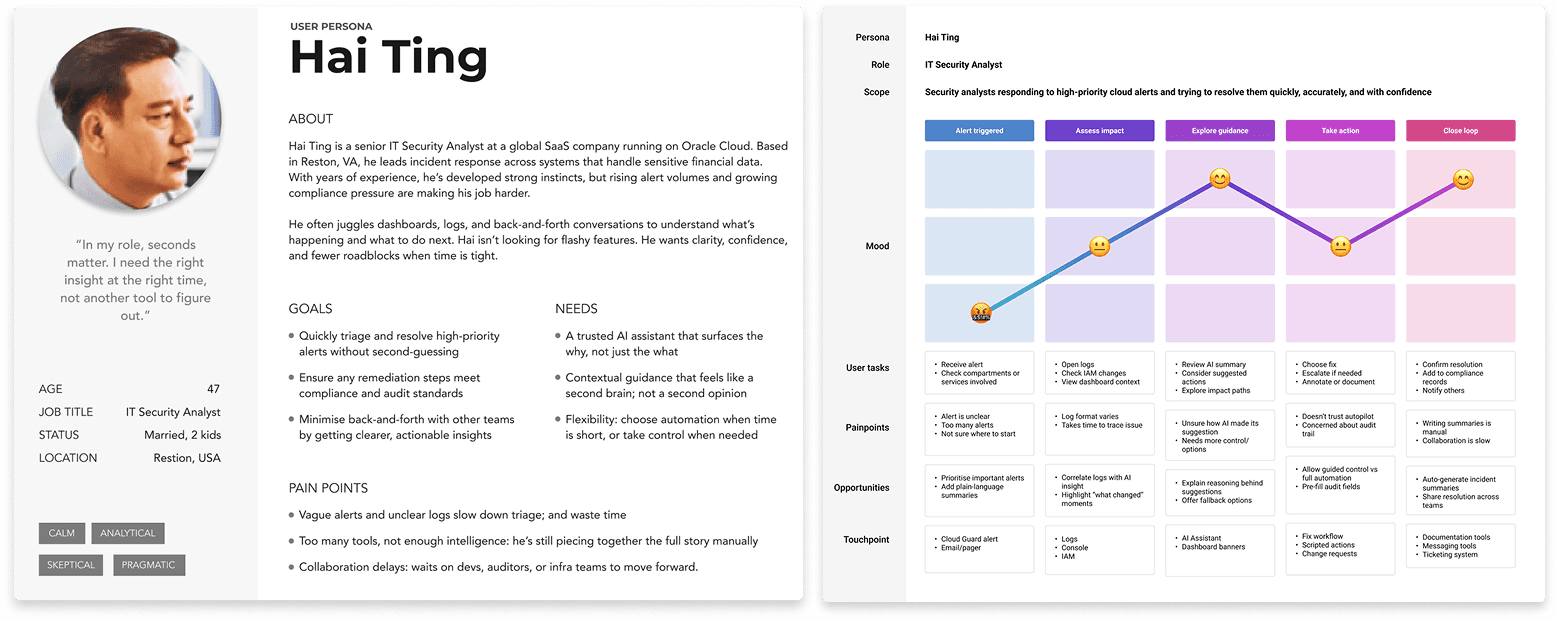
Persona and Journey Map created during the design process
IDEATE
Exploring Patterns That Would Build Trust and Reduce Friction
Guided by our problem statements, we explored a range of assistive AI concepts, from Smart Defaults to error recovery banners and an embedded AI Assistant, to ensure solutions were practical, transparent, and user-centered.
My Contribution
🧠 I led ideation sessions focused on balancing clarity, control, and trust in AI interactions
📊 Introduced an impact and effort matrix to prioritise patterns by user value and technical feasibility
🤝 Facilitated alignment workshops to narrow concepts into Redwood-compliant, testable prototypes
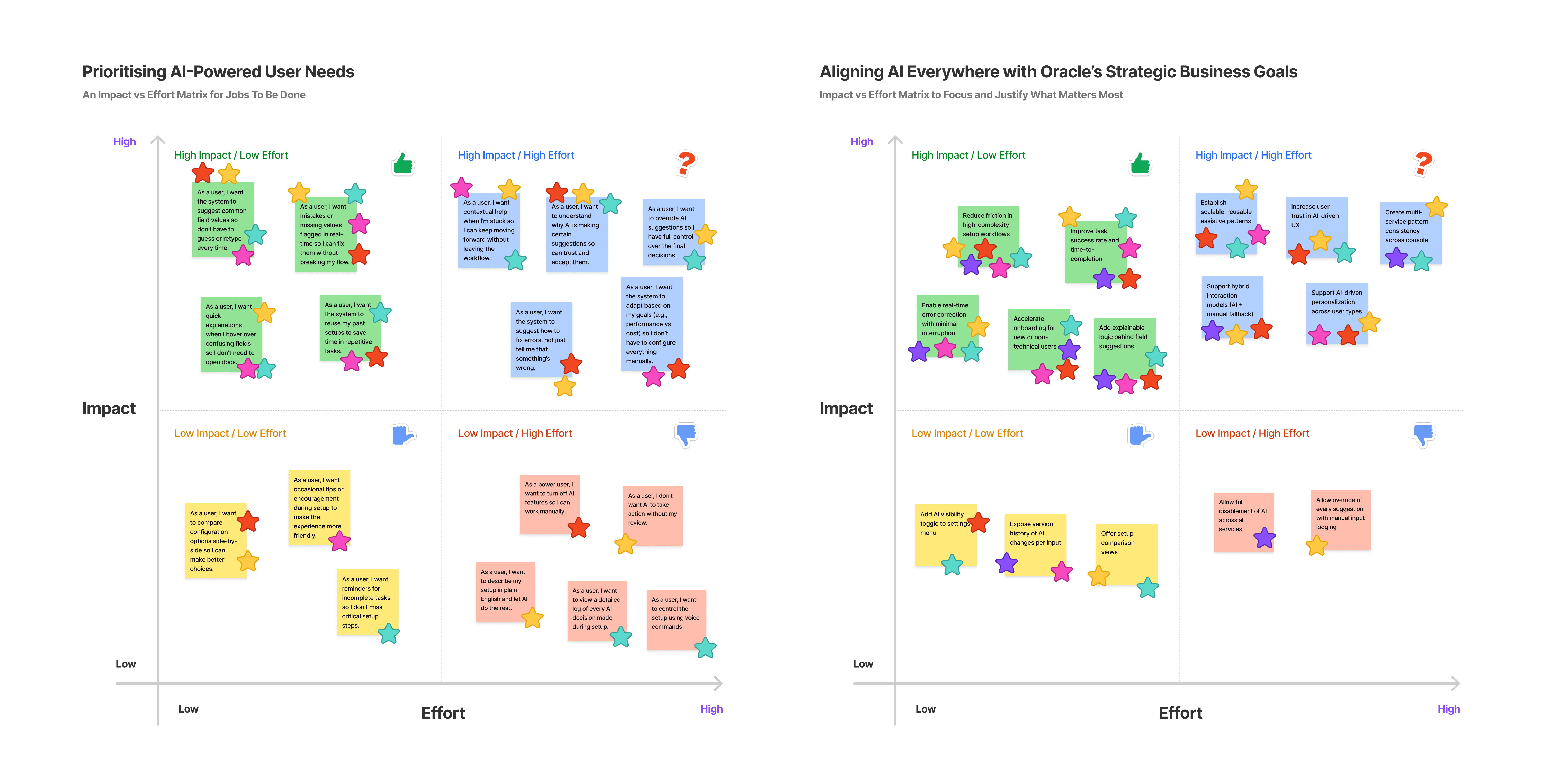
JTBD and Business Goals Impact vs Effort Matrix sessions
By mapping ideas against Jobs To Be Done and business goals impact vs effort matrices, we prioritised concepts that delivered the greatest user value and technical feasibility.
The patterns we advanced included:
Smart Defaults: Suggest values using prior activity and explainable logic
Catch and Save Banners: Provide inline error recovery to keep users in flow
AI Assistant Prototype: Offer contextual chat for triage and investigation
Explainability Cues: Show why recommendations were made to build trust
PROTOTYPE
Bringing the Prioritized Ideas to Life
Lo-Fi Wireframes
Early concept sketches explored how assistive AI could appear in real workflows. Examples included:
Smart Defaults embedded in setup forms
Catch and Save Banners offering inline fixes
An AI Assistant entry point within the Cloud Guard workflow
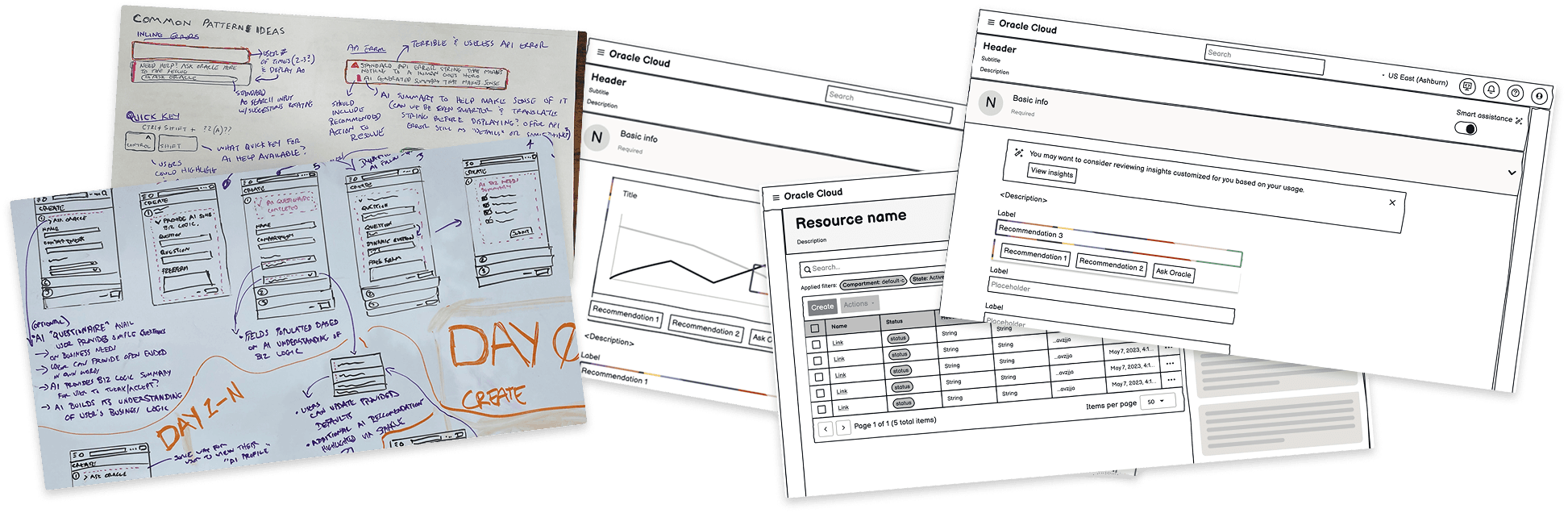
Screenshot from OCI Redwood Toolkit
Before moving to high-fidelity prototyping, we shared our concepts with OCI stakeholders. While they were enthusiastic about the potential, they emphasized the need to balance AI guidance with user control. Based on their feedback, we refined concepts like Smart Defaults and Catch and Save Banners to act as optional aids that users could review and accept, rather than enforced automation.
Hi-Fi Prototype
Using Oracle’s Redwood design system and incorporating feedback from our low-fidelity sketches, I built a comprehensive prototype in Figma that included our prioritized patterns: Smart Defaults, Catch and Save Banners, and the AI Assistant entry point.
1 - (OCI) V1 Prototype
Version Explanation
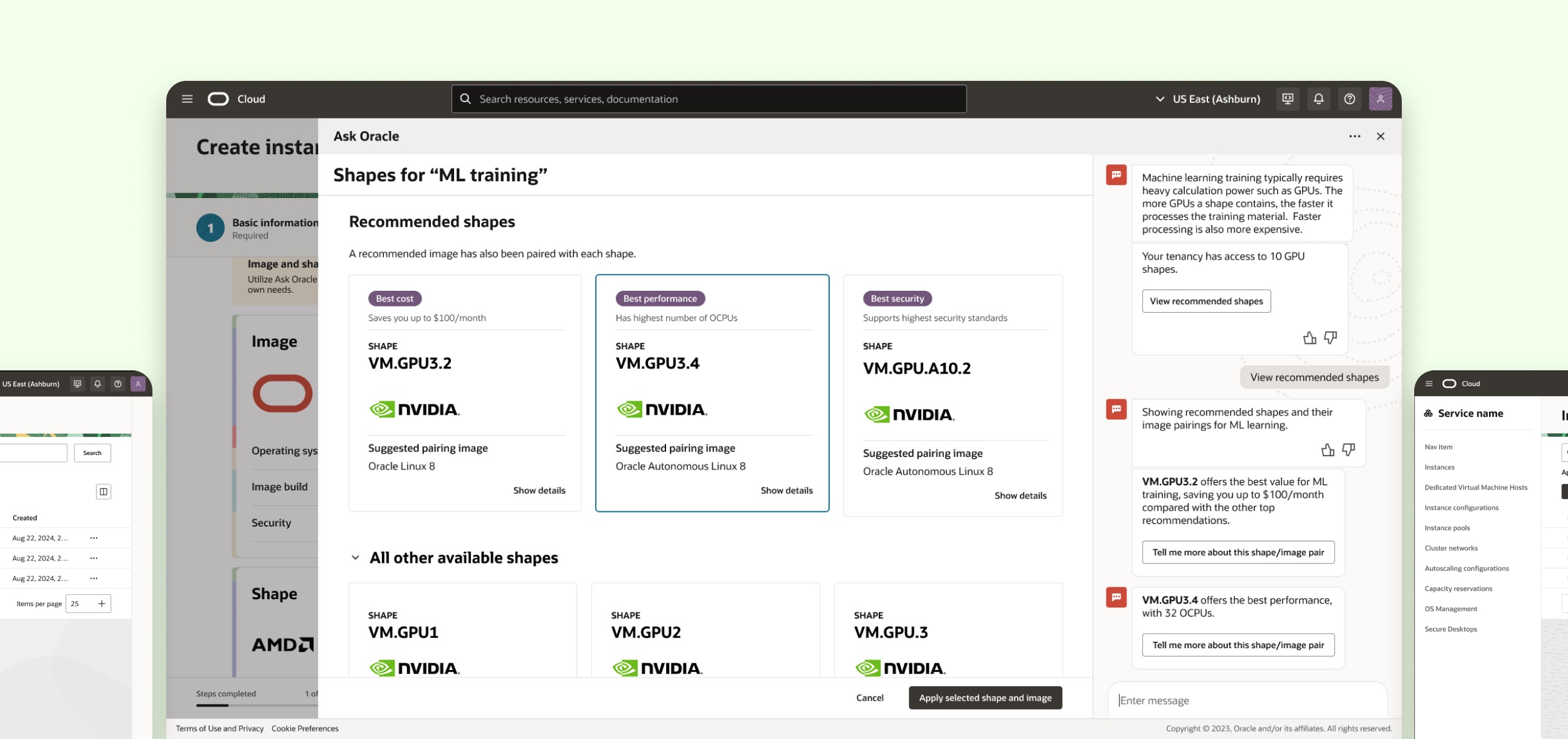
We introduced Smart Defaults in the VM setup flow and Catch and Save Banners for inline error recovery. These patterns formed the foundation of our first assistive AI exploration.
The "Why" Behind the Version
Smart Defaults reduced choice overload by suggesting values based on recent activity
Error recovery banners cut backtracking and reduced cognitive fatigue
Both patterns were intentionally lightweight, building trust without overwhelming users
"I waste so much time figuring out which options to pick. If it could just suggest what I usually use, I’d feel way more confident."
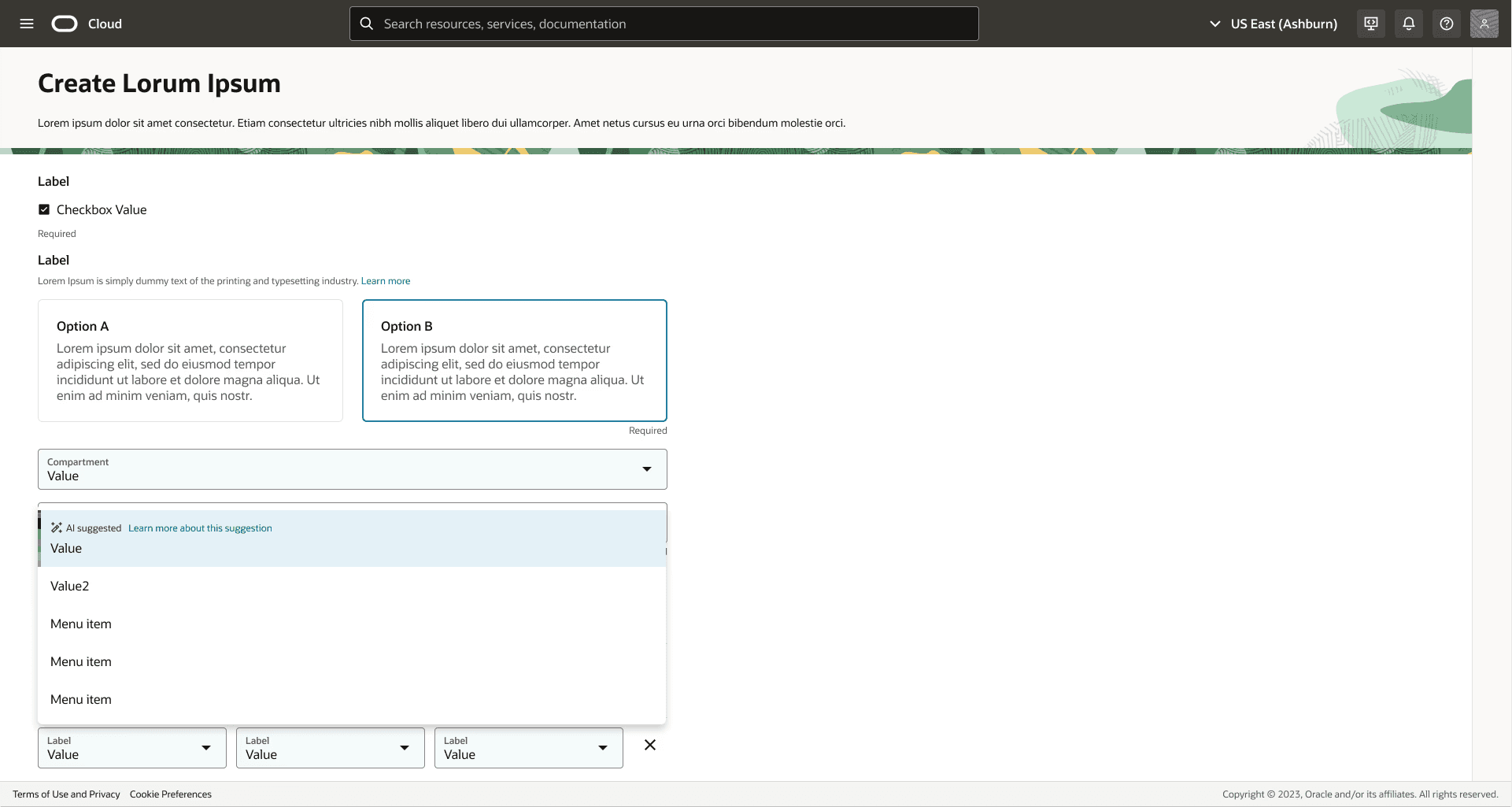
Smart Defaults ideation – AI Everywhere (OCI) V1
2 - (OCI) V2 Prototype
Version Explanation
We added explainability cues to Smart Defaults and introduced an early version of the AI Assistant in Cloud Guard for alert triage.
The "Why" Behind the Version
Developer concerns about “black box” automation led to contextual explanations such as “Suggested based on your last 3 VM setups”
Product managers encouraged a long-term vision, so we piloted the AI Assistant as a natural language entry point, balancing immediate usability with strategic direction
"I like that it tells me why it picked that value. I don’t feel like I’m blindly accepting automation anymore."
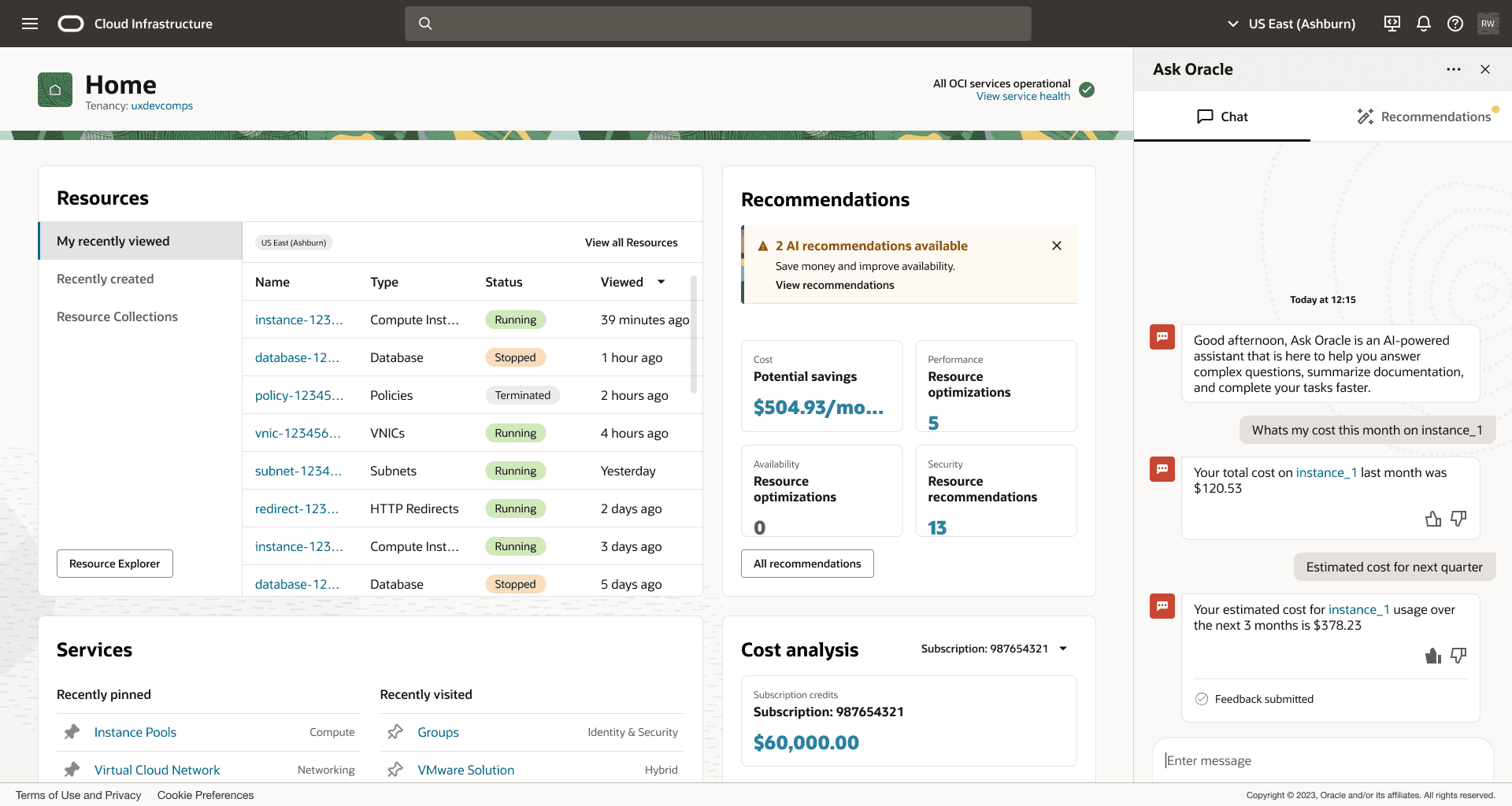
Early AI Assistant concepts – AI Everywhere (OCI) V2
3 - (OCI) V3 Prototype
Version Explanation
We refined the AI Assistant with a structured chat panel and expanded Catch and Save Banners to cover more error states in setup and configuration flows.
The "Why" Behind the Version
Product managers sought a clearer value proposition, so the Assistant was enhanced to surface linked evidence and suggested actions, not just explanations
User testing revealed gaps in error handling, prompting us to expand Banners for broader coverage and consistency across tasks
"This feels less like a help bot and more like part of the console. It’s actually helping me fix things instead of just telling me what went wrong."
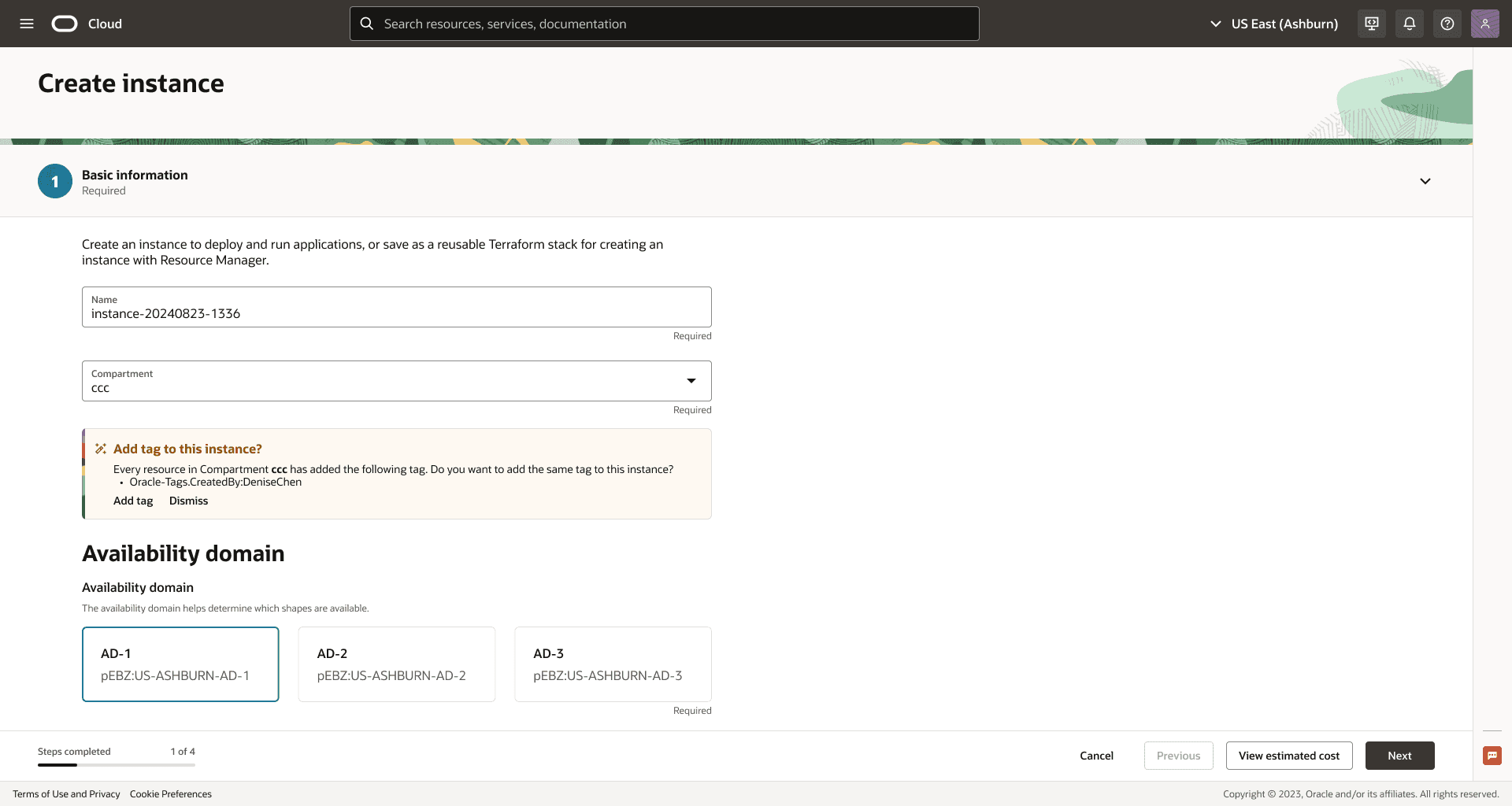
Catch & Save ideation – AI Everywhere (OCI) V3
4 - (OCI) V4 Prototype
Version Explanation
We introduced progressive disclosure for transparency, allowing users to expand and view the reasoning behind AI suggestions only when needed. We also added a review and override step for critical recommendations.
The "Why" Behind the Version
The Security VP stressed the importance of analyst control, so we added optional detail views and override steps to position AI as support, not authority
Trust research confirmed users valued transparency on demand, reducing friction while building confidence in high-stakes workflows
"I don’t always need the explanation, but knowing I can expand and check gives me peace of mind."
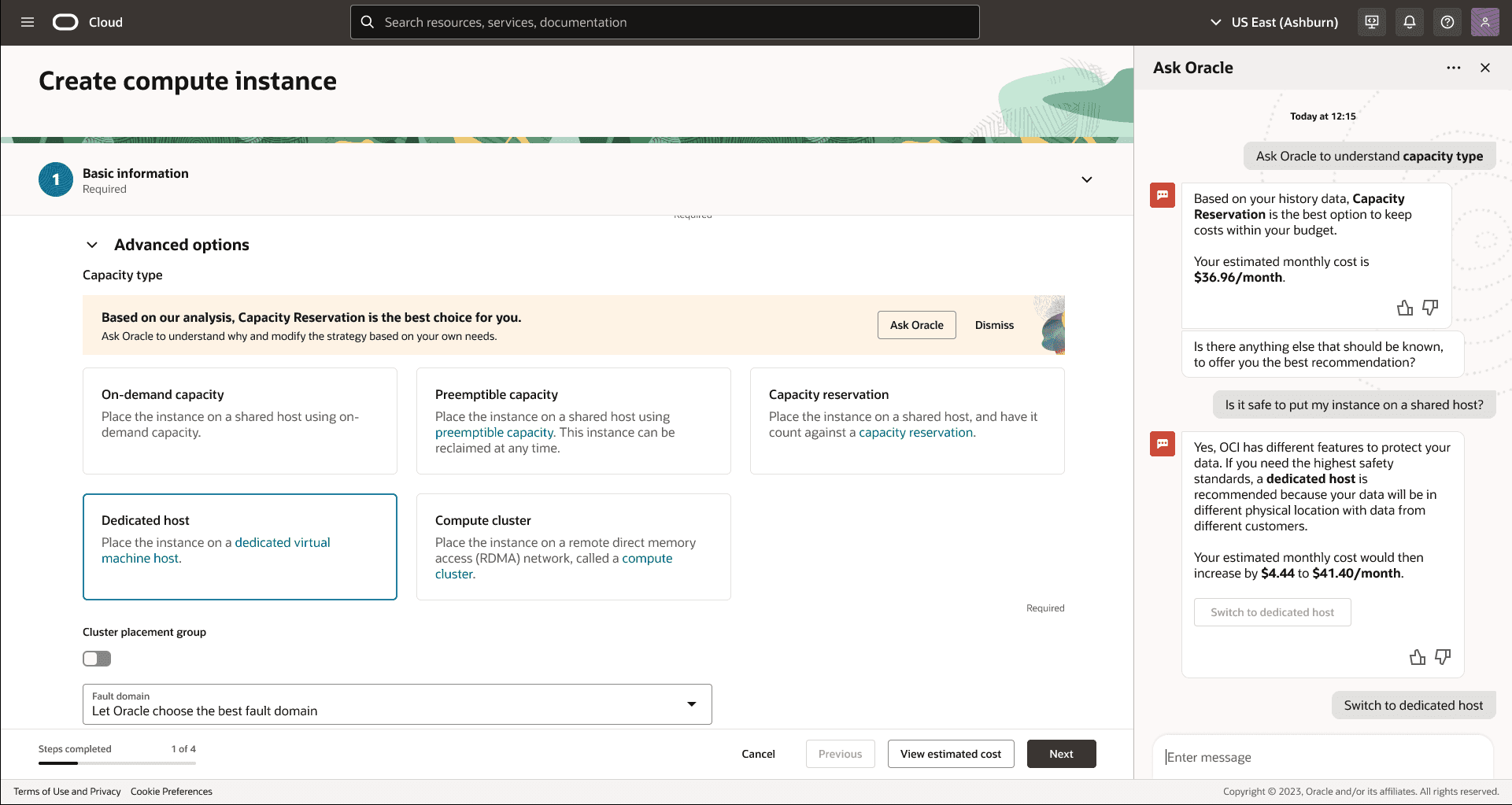
Progressive Disclosure AI Assistant – AI Everywhere (OCI) V4
5 - Hi-Fi Figma
Version Explanation
We created Redwood-compliant high-fidelity prototypes that unified Smart Defaults, Catch and Save Banners, and the AI Assistant into one cohesive experience. This version was designed for cross-team demos and final usability testing.
The "Why" Behind the Version
Product managers wanted a polished vision for roadmap alignment
Developers needed detailed flows to validate feasibility within Redwood and Preact
Consolidating patterns into one system view showcased the potential for scaling assistive AI across OCI services
"This feels like it belongs in the console now. I can see how it all connects and could actually scale across services."

AI Everywhere prototype demo
We were preparing to begin testing this prototype with users when we identified a broader opportunity: aligning AI patterns across multiple OCI services, extending the impact beyond a single workflow.
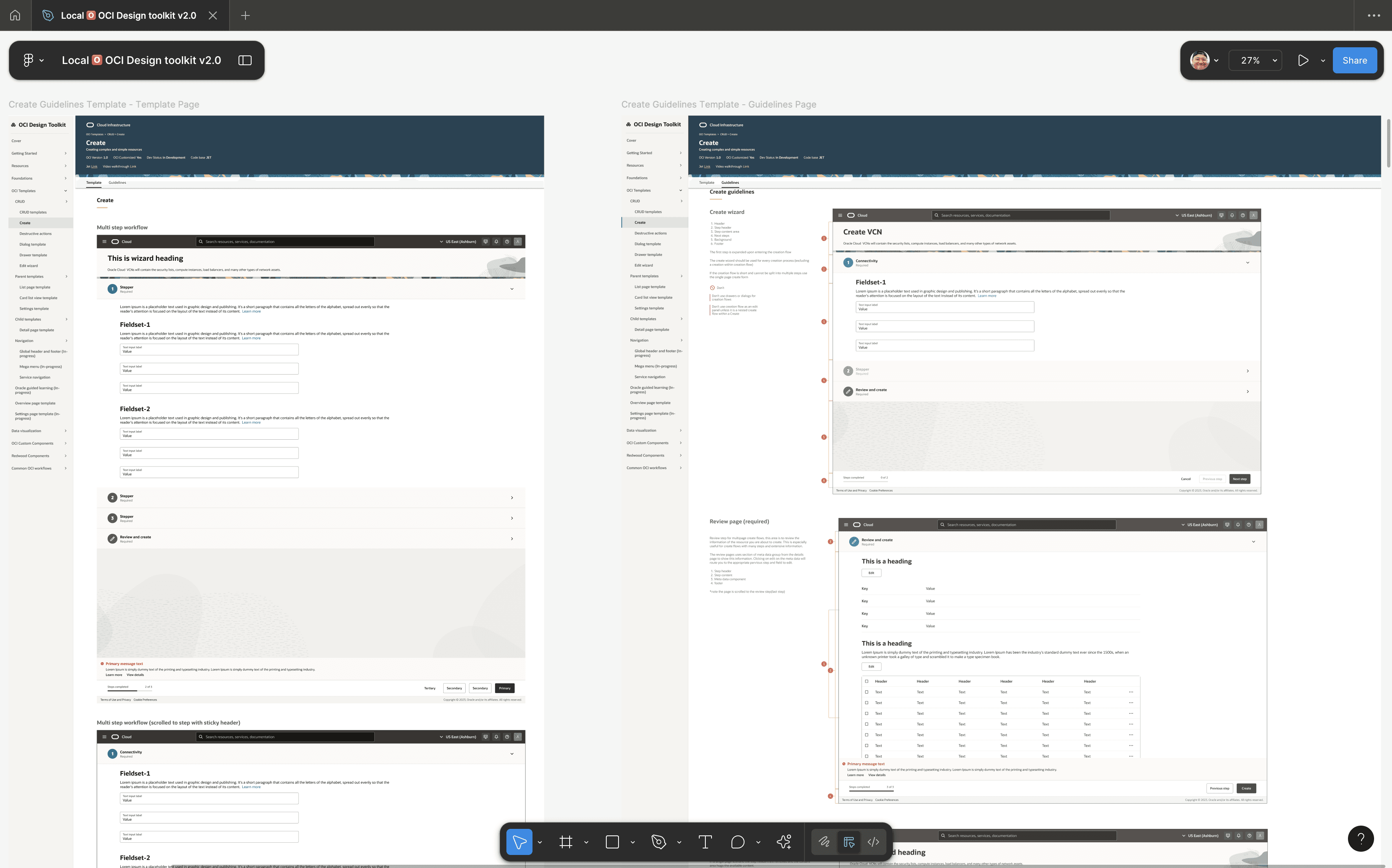
Screenshot from the OCI Redwood Toolkit documenting new component guidelines and features
THE PIVOT
One Question That Changed Everything: “Does AI need to live in a separate panel?”
Standalone help tools already existed, but they failed to meet the needs uncovered in our research: timely guidance, reduced friction, and trust in critical workflows. Our prototypes showed that embedding Smart Defaults, Catch and Save Banners, and an AI Assistant directly into the console mirrored exactly what users had been asking for.
That’s when I asked:
"If AI guidance works best in flow, why force users to leave the workflow to find it?"
My Recommendation to Stakeholders
I advocated for embedding AI guidance directly into OCI workflows, arguing that:
Users already struggled with context switching between documentation and the console
The console was the most natural place for assistive patterns to appear
Workflow-level integration would build trust and drive adoption more effectively than external help tools
Research Round 2: Letting Users Shape the AI Experience
We pivoted from exploring separate help tools to embedding assistive AI patterns directly into OCI workflows. With only two weeks left in the timeline, I led a focused round of research to validate this direction.
Research Question
What is the likelihood of users adopting and trusting assistive AI if guidance remained in separate help tools, compared to embedding patterns directly into core OCI workflows?
Mixed Methods Approach
Qualitative
8 moderated user sessions testing prototypes with Smart Defaults, Catch and Save Banners, and the AI Assistant
Quantitative
20 survey responses measuring trust, task success, and preference between AI patterns and standalone help tools
The Results Were Clear: Embedded AI, Not Separate Tools
Quantitative Results
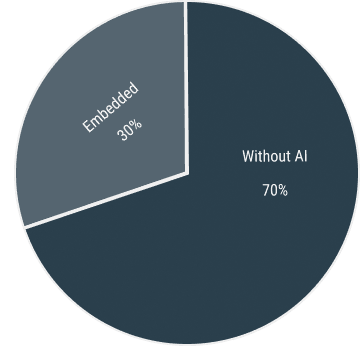
70% first-time success with embedded AI vs 30% without
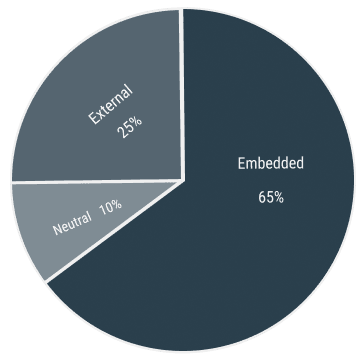
65% preferred embedded patterns, 25% preferred external docs, 10% neutral
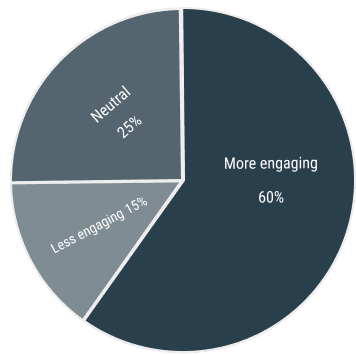
60% found embedded AI more engaging, 25% neutral, 15% less engaging
Qualitative Validation
"It feels natural to get guidance inside the console instead of leaving for docs."
"Having help show up only when I need it makes the experience smoother."
"The embedded patterns feel like part of the workflow, not a bolt-on tool."
DELIVER
Delivering Strategy, Not Just Screens
Final Recommendation to Stakeholders
At the close of the project, I delivered a detailed design strategy and prototype package to OCI product and engineering leads. Based on our research, I recommended a strategic shift to embed assistive AI patterns directly into the console rather than build separate help tools. This approach would reduce friction in high-stakes workflows, improve adoption, and create a scalable foundation for AI across Oracle Cloud.
Primary Recommendation
Embed assistive AI patterns directly into OCI workflows to create a more intuitive and trusted cloud experience.
Because…
The console is the natural place for guidance during high-stakes tasks
Embedded patterns reduce context switching and cognitive load
Integration improves task success and builds long-term trust in AI
But if Integration isn't feasible….
Secondary Recommendation
Implement lightweight assistive patterns such as Smart Defaults and Catch and Save Banners. These deliver immediate value while laying the groundwork for future AI Assistant capabilities.
The presentation was well received by OCI product and engineering teams, who are now evaluating how to scale the recommended patterns across additional Oracle Cloud services.
IMPACT
Impact of the Strategic Question I Asked
My initial question about embedding AI guidance in flow led to:

Complete project pivot from external help tools to assistive in-flow patterns.

Stakeholder buy-in to expand embedded AI across multiple services.

Evidence-backed recommendations that challenged assumptions.
Long-term Impact for Oracle Cloud
Established reusable AI design patterns applicable across multiple OCI workflows
Sparked ongoing conversations about scaling assistive intelligence and ensuring consistency across the console experience
REFLECTION
Navigating Ambiguity, Driving Strategic Change
This project pushed me to question assumptions, balance stakeholder voices, and ensure that AI patterns genuinely enhanced trust and usability across OCI.
🤖 Asking the Right Questions
UX research is not only about answering what we are asked, but about challenging whether we are asking the right questions. The pivotal shift came from reframing AI not as a separate tool, but as guidance embedded directly in workflows.
What I Did
Facilitated workshops that surfaced hidden pain points and reframed assumptions
Pivoted the design direction by asking where AI should live in the console
Anchored recommendations in evidence, enabling stakeholders to align around trust and adoption
🤖 Designing for Scale Under Constraints
We had to deliver Redwood-compliant designs that fit within existing frameworks like Preact and Storybook, while also setting a scalable foundation for AI across OCI.
What I Did
Scoped features into lightweight patterns first (Smart Defaults and Catch and Save Banners) before scaling to the AI Assistant
Ensured consistency by aligning prototypes with Redwood design guidelines
Balanced ambitious ideas with what was feasible within technical and timeline constraints
👥 Cross-Functional Alignment
This project was not only about creating patterns, but also about building confidence across engineering, product management, and security leadership. Each group had different priorities: feasibility, roadmap vision, and trust.
What I Did
Led research with diverse roles to capture cross-functional implications of AI
Aligned competing priorities into a single strategy of “assistive, not authoritative” AI
Delivered prototypes and artifacts that addressed both user needs and leadership concerns
💡 My Key Learnings
Question Assumptions
The biggest shift came from challenging where AI should live, not just how it should look.
Think Systemically
Designing patterns for one workflow meant ensuring they could scale across the entire console.
Always Advocate for the User
Balancing guidance with control required putting user trust above stakeholder expectations.
This experience reshaped how I approach enterprise design. It proved that embedded AI can simplify complexity and build trust, but only when guided by thoughtful research and a user-first mindset.